
Tuesday, 13 December 2016


Monday, 12 December 2016
Penguin Animation
In order to produce this animation I started with the modelling of my character. I have a male and a female character but I used the same model for both and I only added a pink ribbon bow on the head of the female penguin, which I did not model myself because it was a last minute touch. I gave my model a simple rig with controllers that provided me with the freedom of movement. This is how my rigged model looks like:


I was trying to follow the storyboard I created before starting with the animation and I managed to work with it and it was very helpful in the process of animating.
In the first couple of frames the male penguin passes through an open door and notices the red present box on the table. He displays curiosity by peeping into the room behind the wall. He looks around to check if somebody is watching which indicates his cautiousness because he is still not sure if the present is for him. He gets a bit closer and examines the object, the eyebrow movement shows his doubtfulness but keeps his curiosity. When he decides it is safe to get even closer he gets under the table. The scene with the flipper looking above the table gives the character personality and adds a more cartoon-like look of the animation. When he reads the little card by the present his movements get quicker, showing his excitement. While he is opening the gift box he is facing the corner of the room as if he was hiding from someone. But he is not because the present was addressed to him, his behavior shows us that he is shy by nature.
He opens the present and he presents it to the camera...but he is not very fascinated. Why would anyone give him a present with a female ring? This is not a problem because he knows just the penguin who would love this little gift. The movement of the camera, slowly zooming to is eye, sends us to the last scene where he gives the ring to the female penguin. The clumsy way of walking indicates his growing excitement.
Overall, I am happy with the animation, it successfully shows the character thinking, which was the task. It also brings out the character and follows a consistent story. The thing that can be definitely improved is the walking of the character. As he is walking he is tottering, he is being clumsy because of the size of his body and his little legs. But the feel of weight when he is shifting from a foot to foot does not feel quite right. This can be improved by some slight changes on the rig because this is what limited the movement.
Critical Evaluation `Partly Cloudy` by PIXAR Animation Studio
Here is my critical evaluation of the Pixar short animation movie "Partly Cloudy"
The video is available from youtube:
The video is available from youtube:


A study in Body Acting
Body acting is not much different that animating a character..well, it is from a technical point of view, but the animator turns into an actor in the process of animating and should think as one. This skill teaches you on how to express your characters emotions throughout body language. Plus, you have the freedom to exaggerate your animation in a way you can not if you were an actor for instance.
Body acting is a non-verbal way of communication which is one of the most powerful elements that make a believable and dynamic animation. The movements of your character do not always need to be realistic in order to be believable. Here is an example of one very realistic animation :
This example is realistic and believable without any use of exaggeration, squash and stretch or slow in and slow out, but when we animate we also consider the 12 principles of animation. In the next example we can easily see the application of many of those principles which improve the animation and make it more dynamic:
As we can see there are a couple of moments which clearly show the use of squash and stretch, overlapping action and others. Pausing you character for a couple of frames makes a huge impact and brings out the way they are thinking aswell.
Body acting is a non-verbal way of communication which is one of the most powerful elements that make a believable and dynamic animation. The movements of your character do not always need to be realistic in order to be believable. Here is an example of one very realistic animation :
This example is realistic and believable without any use of exaggeration, squash and stretch or slow in and slow out, but when we animate we also consider the 12 principles of animation. In the next example we can easily see the application of many of those principles which improve the animation and make it more dynamic:
As we can see there are a couple of moments which clearly show the use of squash and stretch, overlapping action and others. Pausing you character for a couple of frames makes a huge impact and brings out the way they are thinking aswell.
Character expressing Fear

Here I posed a character (which I do not own) expressing the emotion Fear. There are several components that build up the emotion and help make it believable. The legs and arms are as close to the body as possible, there is a big curve in the spine, the tail is pointing down and the ears are dropped down. Doing this, the character is trying to get as small as possible, almost invisible. The posture of the hands in front of the face also indicate protection. The slight bend in the front leg has a protective indication aswell. The facial expression has a major role in the expressing of any feeling - in this case, the eyes are wide open and the inner points of the eyebrows are lifted up while the outer corners are pointing down.
Sunday, 11 December 2016
Non-verbal communication
Non-verbal communication or body language is the way humans communicate most of the time (60% to 80%). This is the way of expressing emotions, thoughts and feelings without talking and is also applied in animation movies. It is important to understand how to use it in your work as it can often drive a whole story in the opposite direction.
Everything you can express with your body is considered a non-verbal communication: facial expressions, gestures, paralinguistics, body posture, eye gaze etc. All those components help you build a more believable character with unique traits and personality. It also plays a major role in how you convey what your character is thinking.
https://www.youtube.com/watch?v=jdyll8gBRBc
Everything you can express with your body is considered a non-verbal communication: facial expressions, gestures, paralinguistics, body posture, eye gaze etc. All those components help you build a more believable character with unique traits and personality. It also plays a major role in how you convey what your character is thinking.
https://www.youtube.com/watch?v=jdyll8gBRBc

Wednesday, 30 November 2016
Rocket Animation

For this task I had to create a storyboard for a rocket animation and then create the actual animation following it. The story is expressing the excitement of the little rocket who wants to go to the moon. In the first half of the animation he notices the moon and starts running in circles and bouncing up and down. The little guy gets overexcited and takes off in a clumsy way. Once he lands on the moon he expresses his satisfaction by raising his eyebrows. The emotions have been visualised in the animation pretty well. The only issue I had in the process of animating was the rotation of the body as the rig was not properly set but I think I managed to work with what I had. The follow-through movements of the antenna give the character personality and therefore help the audience better understand his thoughts and feelings.
12 principles of animation
The major thing I notice when I am talking about the 12 pinciples of animation now is that they have become way more noticeable for me than they were a year ago. I started noticing them everywhere, form animation movies I am watching to not-animated movies, even in my every day life when I am socializing with people. And not only I can see the difference between each pinciple but I also find myself thinking about ways to improve them in other peoples work.
They are all equally important when it comes to animating because they help the audience engage with the particular character. In my animations I usually copy my own behavior and movements as I think this helps me a lot with the visualization of my character's thoughts.
They are all equally important when it comes to animating because they help the audience engage with the particular character. In my animations I usually copy my own behavior and movements as I think this helps me a lot with the visualization of my character's thoughts.
Storyboard research
I quite enjoyed doing the research on storyboards using Pinterest.com. It provided me with a range of styles and themes. Before I did the research I already had an idea about my storyboard but I did not have a clear visualisation. After I had a look at the work of other storyboard creators I came up with ideas of how exactly I should visualise my animation idea and how to make it easily understandable. Here is a link to my board in pinterest: https://www.pinterest.com/ra43700/sroryboard-research/?s=3&m=facebook
Wednesday, 19 October 2016
Excitement and how to express it throughout for character?
Excitement is a stage of euphoria and physical activation, it makes us full of adrenaline and active. The most common synonyms are euphoria, enthusiasm, frenzy, ferment. Excitement is mental but it affects the whole body and it has strong physiological responses. It is one of the main things that engages our audience.
The first thing we need to understand when it comes to expressing excitement with our animation is what is the emotion provoked by. It can come from expectancy of an event, the love of doings something etc., but it can also be fueled by another emotion as anger.
How can you pose you character in order to show excitement?

When people are happy or excited of an upcoming event or so they usually start dancing or jumping, clap excessively, rock back and forth etc. Animators usually use personification to their characters so the audience can better engage with the film. That means that their animation is mostly inspired by the feelings and emotions of the people around them or even themselves. Some of the `symptoms` of excitement you can make use of include:

The first thing we need to understand when it comes to expressing excitement with our animation is what is the emotion provoked by. It can come from expectancy of an event, the love of doings something etc., but it can also be fueled by another emotion as anger.
How can you pose you character in order to show excitement?
When people are happy or excited of an upcoming event or so they usually start dancing or jumping, clap excessively, rock back and forth etc. Animators usually use personification to their characters so the audience can better engage with the film. That means that their animation is mostly inspired by the feelings and emotions of the people around them or even themselves. Some of the `symptoms` of excitement you can make use of include:
- bottom lip tucked under and bitten by the teeth
- quick short hops
- energetic movement of the hands
- shivering body
- hands and one leg lifted up
- eyes wide open
What is a good model?
Before starting with the modelling you should have a clear idea of what you are actually trying to achieve. Having some reference images helps with the creation of good proportions which is a very important factor. You should always aim to make your character distinctive. The character must me appealing, strong and interesting in order to catch the audiences eye. For instance, when devising The Simpsons, the creator knew that the bright yellow skin and the unusual design of the characters would grab the attention of the viewer.
The strong topology makes the work of the animator much unchallenging and pleasant. While creating the model it is a good habit to always check for errors like triangles or holes instead of fixing them after you finish. It is essential that you have good edge flow in certain areas of the mesh - usually around the eyes, the shoulders, knees etc. This aspect of modelling matters if you are planning to rig the model for animation because the poorly made model is hard to rig and skin, it also deforms badly when you are animating it.


The strong topology makes the work of the animator much unchallenging and pleasant. While creating the model it is a good habit to always check for errors like triangles or holes instead of fixing them after you finish. It is essential that you have good edge flow in certain areas of the mesh - usually around the eyes, the shoulders, knees etc. This aspect of modelling matters if you are planning to rig the model for animation because the poorly made model is hard to rig and skin, it also deforms badly when you are animating it.
Friday, 14 October 2016
Pose to Pose animation
I created this short pose to pose animation following a Linda,com tutorial which I found on Youtube ( https://www.youtube.com/watch?v=GTQAOPhQLV4 ). I find the tutorial helpful as it covers the basics of creating a pose to pose animation and this is actually all you need to know.
There is also another tutorial ( https://www.youtube.com/watch?v=v8quCbt4C-c ) I found which is really good when it comes to understanding the theory behind this method and the difference between pose to pose and straight ahead. Both methods have their benefits and it is good to know the difference and app;y the method that will work the best for your animation.


Week 2 Storyboard Exercise


The story was influenced by the fact that when male penguins fall in love they search the whole beach in order to find the perfect pebble. When they finally find it they put it right in front the female penguin they like. If she accepts the pebble, they spend their whole life together.
Tuesday, 11 October 2016
What is a good storyboard?
A storyboard is one of those aspects of filmmaking which help you "see" the movie before you have created it. Storyboarding also helps the animator determine whether the shots are dynamic or not. The storyboarding process form widely known today was developed at Walt Disney Productions during the early 1930s in order to help directors visualize the scenes and find potential problems before they occur.
DreamWorks advises film directors and cinematographers to avoid flat staging in their storyboards because the image contains three vanishing points. Thinking in 3-point perspective makes the storyboard appear more dynamic, adds more depth and volume. Drawing a grid also puts the character on an easily discernible plain which helps you gain more control over your character.
In order to add depth, texture and sense of location the use of foreground, mid-ground, background and far background is very helpful.
When dealing with multiple characters one easy way to organize them is labeling, because without some sort of order to how you stage your characters, cutting back and forth between them could be confusing to you, the editor and the audience.

DreamWorks advises film directors and cinematographers to avoid flat staging in their storyboards because the image contains three vanishing points. Thinking in 3-point perspective makes the storyboard appear more dynamic, adds more depth and volume. Drawing a grid also puts the character on an easily discernible plain which helps you gain more control over your character.
In order to add depth, texture and sense of location the use of foreground, mid-ground, background and far background is very helpful.
When dealing with multiple characters one easy way to organize them is labeling, because without some sort of order to how you stage your characters, cutting back and forth between them could be confusing to you, the editor and the audience.

Week 1 Squirrel Animation
This short animation shows a character getting through a obstacle. The main aim of the animation is to visualise what is going on in the characters mind, how he thinks and overcome the obstacle. The animation has some technical issues but it successfully shows the thinking process of the squirrel. In the beginning of the animation the squirrel sees the nut and clearly shows his interest in it by stretching up and opening its mouth in excitement. After the bad camera movement we come to the scene where the character notices that there is an obstacle he needs to overcome. By looking round the squirrel is familiarizing with the situation and starts thinking of a way to solve the problem which lies between him and the nut. We realize the character has a solution when the explanation mark appears above his head. And finally, the character expresses his satisfaction with the great job he did by eating the treat with a smile.
Tuesday, 19 April 2016
Mini Project
For this task I was asked to create a parody of the Pixar intro animation but with my own name.
The animation demonstrates Squash and Stretch in the movement of the body of the squirrel and the letters, which squash and stretch when the character is jumping from one to another. The teeth of the animation character boost its appeal and make it comic. I have demonstrated what I have learned about the Secondary Action, Follow Through and Overlapping Action principles with the animation of the big tail of the squirrel. The tail follows the movement of the body and overlaps with every following jump the squirrel does. The movement of the tail is very important for the whole animation, as it makes it more realistic and believable. I have used it to also express the feelings of the squirrel, for instance, when the squirrel sees the `playground` (my name), its tail stretches up to show the amazement of the character.
I have applied Exaggeration to the movement of the letter `I` when it stretches up really quickly. This contributes to the comedic look of the animation. The big jump that the squirrel does just before it starts playing on the playground proves my skills in the Arcs principle. The character does a really nice and smooth jump and the trajectory demonstrates Arcs perfectly.
The Slow in and Slow out principle is shown in the final fall in the animation. The character falls from the sky very quickly and when it hits the little platform, it slides down to the ground. I have also demonstrated Anticipation in my animation - before two of the jumps, the squirrel anticipates by trembling its tail. This also reveals a lot about the personality of the character and it shows what the character is thinking at the moment.
I have applied the Straight Ahead and Pose To Pose principles for all of the jumps of the character by changing the timing in the graph editor. The movements start slowly, build up and end slowly which helps the final look of the animation, as it prevents it from looking mechanical. Solid Drawing is applied in the animation when the squirrel is bouncing on the letter `A`. The movement gives the character weight, balance and volume. The lighting in my scene also helped for the three-dimensional finish.
Timing is one of the most important principles of the animation as it affects the personality and nature of the animation. I think I have applied the right timing, especially in the last few frames of the animation. The time before the appearance of the squirrel feels just right and again - it contributes to the success of the final product.
I have applied Staging to the movement of the camera which presents the idea of the animation clearly. For instance, when the squirrel is shot up in the sky, the camera goes up and then it turns left and right. This shows that the camera is searching for the object and presents that idea unmistakably.
References:
The model is downloaded from AnimationMentor: http://www.animationmentor.com/free-maya-rig/
Monday, 11 April 2016
Appeal, Exaggeration, Solid Drawing and Staging Examples from `Up`
Appeal:


These two screenshots are in contrast when it comes to the emotion that they express. In the first image we see the love in Ellie's eyes and in the second one they are replaced with Carl's, full of sorrow but also love. The colours in both images are also in contrast as the bright tones in the first screenshot contribute to the happy and energetic atmosphere while the dark shadows convey sadness.

Exaggeration:


In the first screenshot we see Ellie passionately kissing Carl but the actual exaggerated moment is Ellie's behaviour just before the kiss. She is jumping up and down, her eyes widen and she does an exaggerated jump towards Carl.


The second screenshot depicts another exaggerated jump I found. This time, the one jumping is Carl and he does that in order to stop the balloon cart from flying away. Carl's actions are obviously quickened and sudden.
Using exaggeration, the animator can easily reveal a lot about the personality of the character. For instance, Ellie's jump and behaviour before the kiss reveal her excitement and impatience. Carl's jump, on the other hand, demonstrates his bulky gestures. This technique also helps the audience better understand the particular scene.
Solid Drawing:


I find these two examples of Solid Drawing remarkable, as they give the characters the needed depth, volume, weight and balance for creating a realistic three-dimensional animation. In the first screenshot we feel the perfect weight, created by the deep shadows inside the vehicle which are in contrast with the shiny surface of the side view mirror. In the second image the light behind the character gives him volume and balance. The specific angle of the light also makes Carl appear more realistic and believable.
Staging:

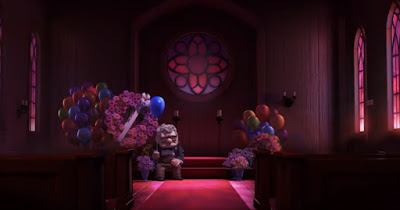
According to Ollie Johnston and Frank Tomas, Staging is all about the presentation of any idea, so that it is completely and unmistakably clear. And that is exactly what these two screenshots demonstrate. Even if you have not seen the video above, you could easily say what the general idea of the scenes is. Unfortunately, both of the shots are tragic and saturated with unhappy feelings but that is what the animators were looking for. Staging aims to make you feel the pain, to get you into the characters' shoes.


Subscribe to:
Posts (Atom)